Qware SND‑WT335PK Walkie‑Talkie Manual Reconstruct
Let’s give you something useful, not a scavenger hunt.
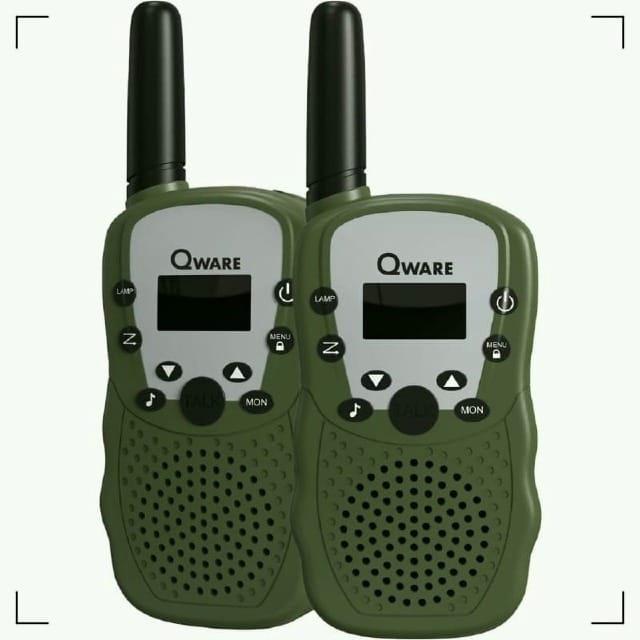
These Qway walkie‑talkies are a bargain, the kind of cheap hardware that somehow survives the fall when everything else in your life doesn’t. If your kid has the gift of endless chatter, the kind that drills into your skull long after they’ve left the room, this set will keep their voice haunting you from across the house, the yard, the neighborhood. For the price, you can’t complain. Not out loud, anyway.
But trouble always finds a way in. In my case, it came wearing small shoes and sticky fingers.
The kid grabbed both radios, vanished like a petty thief, and tossed the box - manual included - straight into the bin before I even had a chance to blink. Then came the meltdown. Not because the devices were broken. Because I didn’t magically know what a channel was, or why CTCSS/DCS codes or VOX mattered. As if I’d spent my youth running comms for some back‑alley operation.
Yeah, you can hear it in my voice; this is a testimony.
Here is the manual I stitched together from scraps scattered across the Internet, pieced together like a detective reconstructing a crime scene, and checked against Copilot and verified feature sets from similar models.
They’re dug up from the bone yard, pieced together in the dark when the rest of the world is asleep. They cost something to tell.
If you want to keep the lights on in this place, if these words are worth more to you than a cheap cup of coffee, then step up. Don’t just be a ghost passing through. Become a member. Keep the ink flowing.
1/ Overview
The SND‑WT335PK is a compact PMR/FRS walkie‑talkie designed for short‑range communication. It supports:
- 8–16 channels (depending on region)
- CTCSS/DCS privacy codes
- VOX hands‑free mode
- Call tones
- Key lock
- LED flashlight
- Type‑C charging (if rechargeable version)
I don't know what all of that means, but it's impressive.
2/ Turning On/Off
- Hold the Power/Menu button for ~3 seconds to turn on.
- Hold again for ~3 seconds to turn off.
3/ Battery Indicator
- Full icon → battery OK
- Half icon → medium
- Flashing icon → low battery
4/ Volume Control
- Press ▲ to increase volume
- Press ▼ to decrease volume
- Levels range from 01–08
5/ Selecting a Channel
- Turn on the device.
- Press MENU once — channel number flashes.
- Use ▲/▼ to choose a channel.
- Press PTT to confirm.
6/ Privacy Codes (CTCSS/DCS)
- Press MENU twice — code flashes.
- Options:
- OFF → no code
- 01–38 → CTCSS
- 39–99 → DCS
- Select with ▲/▼
- Confirm with PTT
7/ VOX (Hands‑Free Mode)
- Press MENU three times.
- Choose sensitivity:
- OF → off
- 1 → low
- 2 → medium
- 3 → high
- Confirm with PTT
8/ Call Tones
- Press MENU four times.
- Choose tone 01–10
- Confirm with PTT
- Short‑press the CALL button to send the tone.
9/ Key Beep
- Press MENU five times.
- Select ON or OF
- Confirm with PTT
10/ End‑of‑Transmission Tone
- Press MENU six times.
- Select ON (tone) or OF (silent)
- Confirm with PTT
11/ Flashlight
- Short‑press the Flashlight button to toggle
- Long‑press to scan channels (depending on variant)
12/ Key Lock
- Long‑press the CALL button
- Locks all keys except PTT and Power
13/ Talking & Listening
- Hold PTT to talk
- Release PTT to listen
- Keep the microphone 5–7 cm from your mouth
- Do not cover the mic
14/ Channel Scan
- Long‑press the Scan button
- The radio cycles through channels until it detects activity
You want more? Please become a member and you too will be honoured with a downloadable manual, a FAQ and a troubleshooting guide available only to paid-members.