Photo culling that doesn’t take all weekend
A fast keep-delete pass with consistent rules.

They’re dug up from the bone yard, pieced together in the dark when the rest of the world is asleep. They cost something to tell.
If you want to keep the lights on in this place, if these words are worth more to you than a cheap cup of coffee, then step up. Don’t just be a ghost passing through. Become a member. Keep the ink flowing.
You know the feeling. A card full of files sits on your desk like evidence. A thousand frames, most of them almost right, and all of them asking for your attention. You tell yourself you’ll “sort them later.” Later turns into Saturday. Saturday turns into the whole weekend. Weekend turns into 10 years later.
A photo culling workflow fixes that, not by making you care less, but by making you decide faster, with the same rules every time. You don’t need a perfect system. You need a repeatable one. Quick. Cold. Fair.
Before you start, set the room and the rules
Speed starts before the first photo loads. If you begin messy, you’ll cull messy. You’ll second-guess. You’ll bargain. You’ll zoom on every frame like you’re looking for a pardon.
Do this first, every time:
- Timebox it: set a timer for 20 minutes. When it rings, stand up. Water. Reset.
- Kill distractions: phone out of reach, notifications off, music that doesn’t talk back.
- Build previews (or proxies) if your tool needs it. Waiting for renders is how “quick” dies.
- Pick your inputs: keyboard shortcuts ready, trackpad sensitivity sane, full-screen view if possible.
- Decide your output: are you delivering 50 images, 200, or just “the story”? Put a number on it.
Tool choice matters less than rules. Lightroom, Capture One, Darktable, digiKam, Bridge, Photo Mechanic, FastRawViewer, XnViewMP, it’s all fine. The point is to get to a view where one key means keep, another means reject, and your brain doesn’t have to negotiate the terms each time.
If you want a more formal take on the mindset, the blunt framing in Retouching Academy’s post-shoot culling guide matches the truth: selection is an aggressive act. It has to be.
Pass 1: Keep or delete in 1 to 2 seconds
Pass 1 is not the time for poetry. It’s not the time for “maybe.” It’s triage.
Your only job: decide keep or delete in 1 to 2 seconds per frame.
Here’s the rule that keeps you fast: don’t zoom unless the decision depends on focus. If the photo is dead on expression, light, moment, or composition, you don’t need a microscope to pronounce it.
Use this mental checklist, in this order:
- Is it broken? (missed focus, accidental frame, camera shake, blocked subject) Delete.
- Is the moment real? (expression, gesture, timing) If no, delete.
- Is it meaningfully different from the last one? If not, delete.
- Would you show it without explaining it? If yes, keep.
When you hit a burst, don’t peck at it. Run it like a flipbook. Keep one, maybe two, then move on. Your goal is momentum.
If you need a refresher on how flags, stars, and shortcuts fit together in common editors, PictureCorrect’s guide to culling and rating in Lightroom lays out the mechanics. The mechanics are fine. Your discipline is the hard part.
Pass 1 ends when the trash is full. Not when your doubts are quiet.
Use consistent culling rules, so you don’t argue with yourself
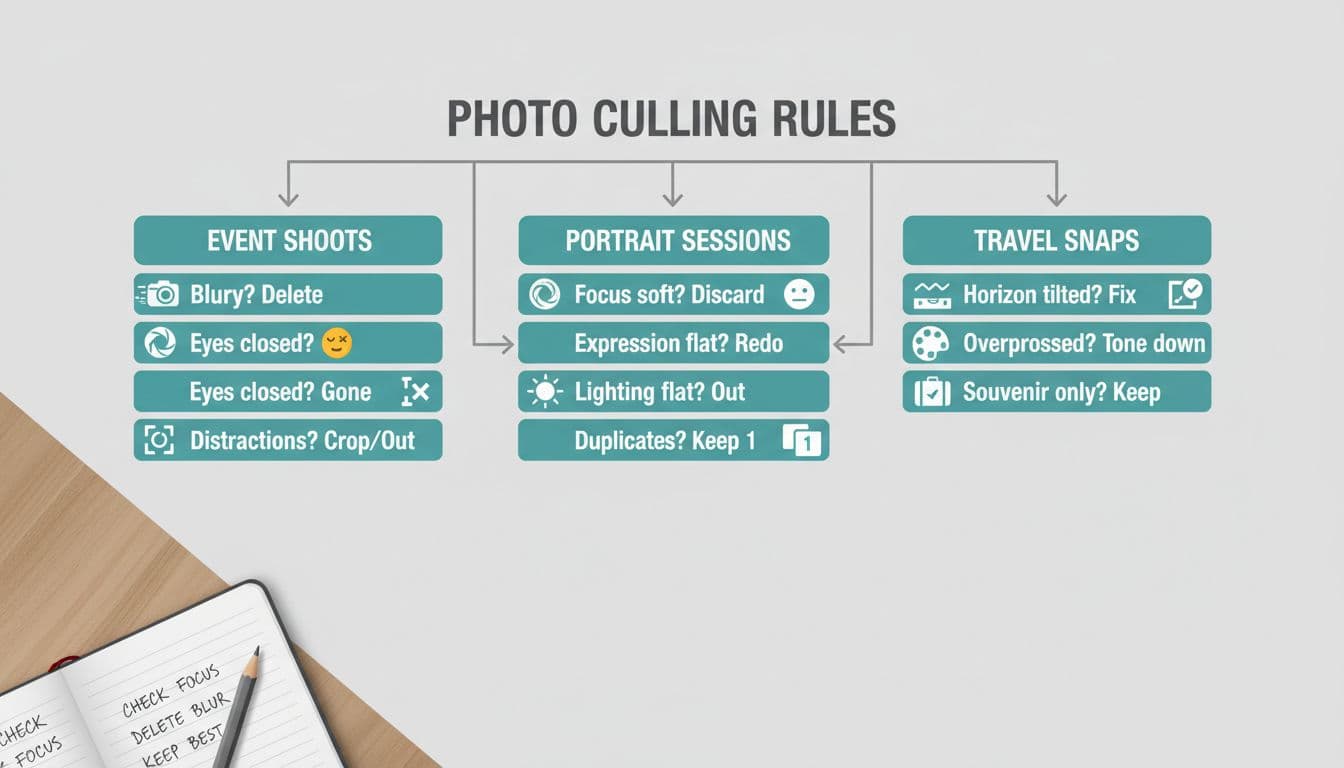
Your future self is tired. Your future self will lie. They’ll say, “This one might be useful.” Useful is how hard drives fill up and galleries get soft.
So you write rules like a contract, and you don’t renegotiate mid-cull.
Here’s a sample rule set you can steal and adjust:
| Shoot type | Auto-delete rules | Keep rules | Tie-breaker when similar |
|---|---|---|---|
| Events | blinks, weird faces, blocked subjects, duplicates | clear faces, clean moment, strong light | pick the frame with best expression |
| Portraits | soft eyes, awkward hands, messy hair you can’t fix fast | sharp eyes, calm pose, clean background | pick the simplest background |
| Travel | crooked horizons (unless intentional), cluttered frames, repeats | strong light, clear subject, sense of place | pick the frame with the best edges |
A few hard lines that speed everything up:
- One “story” photo beats five “pretty” photos.
- If the subject’s eyes are closed, it’s gone (unless it’s part of the moment).
- If you need heavy cropping to save it, it’s on probation. Most probations end the same way.
If you’re curious how different workflows handle this with and without automation, Excire’s breakdown of culling faster is useful context. The lesson holds either way: the rule set does the heavy lifting.
Pass 2 and Pass 3: Rate the keepers, edit, then lock it down
Pass 2 is where you turn “kept” into “delivered.” You’re not hunting for perfection, you’re sorting value.
A simple rating scheme works across most tools:
- 5 stars: the heroes, the ones you’d print.
- 4 stars: solid deliverables.
- 3 stars: backups, alt angles, safe coverage.
- 1 to 2 stars: only if you need volume, otherwise let them sink.
Then Pass 3: edit and export. Keep it boring. Apply a preset, sync a batch, spot-check, export. If you find yourself doing surgery on a weak photo, stop. That’s your earlier self asking for another chance.
After export, lock the case file.
Back-up the keepers the same day. The simple version is the 3-2-1 idea: three copies, two kinds of storage, one off-site. Even if you don’t hit it perfectly, two copies in two places beats hope.
Then save what worked:
- Preset your culling filters (flags, rejects hidden, keepers only).
- Reuse smart collections or saved searches: “5-star portfolio,” “deliverables,” “to print.”
- Name consistently so next month’s you don’t play detective.
If you want to see how AI-based culling is being treated in the wider scene without treating it like magic, this Fstoppers piece on Narrative Select’s growth gives a grounded snapshot. Use automation if it helps. Keep your rules anyway. Your taste still has to drive.
Conclusion
Your weekend doesn’t need to be a graveyard of “almost” photos. Set the room, run a fast first pass, and make your rules stick like they’re written in ink. When you treat your photo culling workflow like a timed interrogation, the answers come quicker, and the noise drops away. Next time you import a fresh shoot, you’ll feel it: less dread, more control, and a smaller pile of ghosts.